tattletag
An AI disclosure for newsletters needs one line of text in the footer of every issue, a badge on the web version and a short note on your about page. That is the whole system. Email adds one twist that blog posts never face: subscribers read you in Gmail, Outlook and Apple Mail, and not all of them show images the same way. So the label that matters most in a newsletter is the one made of words.
Which AI level fits your newsletter issue?
Tattletag sorts every piece of content into four levels. For a newsletter, the test is simple: whose sentences land in the inbox?



| How the issue was made | Level | Footer line |
|---|---|---|
| You wrote every word; AI wrote nothing | Human-made | Made by humans, without AI. |
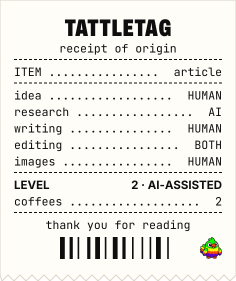
| You wrote it; AI suggested the subject line or fixed grammar | AI-assisted | Written by people, with AI help for research and editing. |
| You wrote the essay; AI summarised the five links in the roundup | AI-assisted, with a note on the roundup | Written by me; link summaries drafted with AI and checked. |
| AI drafted the issue from your notes; you rewrote and fact-checked it | AI-made, human-checked | Made with AI and checked by a human before publishing. |
| An automation pulls news, AI writes the digest, it sends on a schedule | AI-generated | Generated with AI. |
| You wrote the text; the header image comes from an image model | AI-assisted, plus a caption on the image | Image: made with AI. |
Curated newsletters deserve a second look. A digest of ten links with AI-written blurbs is level 3 when you read every blurb against the source, and level 4 when nobody does. Readers forgive a robot summary; they do not forgive a summary that gets the linked story wrong under your name.
Where does the AI disclosure go in an email?
Here is why the footer wins: it is the one spot every subscriber sees in every client, and you set it once in your template.
- Footer of every issue, as text. One sentence from the table above, next to the unsubscribe link and the address block. Set it in the template so no issue goes out without it.
- Top of the web version. The archive page on Substack, beehiiv, Ghost or your own site can carry a pill badge under the headline, exactly like a blog post.
- About page and welcome email. Explain your levels once, in the two places every new subscriber meets first.
- On the issue itself when it changes. If your usual issue is human-made and this week AI wrote the roundup, say so at the top of that issue.
Do AI badge images work in email clients?
Mostly, with gaps you need to plan for. Tattletag badges are SVG files, and the caniemail.com support table for SVG images (last tested 16 September 2026) puts support at about 98% of tested clients when partial support counts. The details matter more than the headline number:
| Email client | SVG badge image (caniemail, Sept 2026) | What to do |
|---|---|---|
| Gmail (web, iOS, Android) | Partial: shown, but turned into a PNG copy | Fine to use; keep the text line |
| Apple Mail (current Mac and iOS) | Yes | Fine to use |
| Apple Mail (macOS 13, iOS 13 and 14) | No | Text line carries the label |
| Outlook for Windows 2007 to 2016 | No | Text line carries the label |
| Outlook 2019, Outlook.com, new Outlook apps | Yes | Fine to use |
| Yahoo Mail | Yes | Fine to use |
Gmail is the newcomer here: caniemail’s tests from 2020 to 2024 marked Gmail webmail as no support at all. So the rule for newsletters is text first, image second. Give the image an alt text that names the level, so even a blocked image tells the reader the truth: alt="AI-assisted: AI disclosure badge by Tattletag".
Footer line and badge to copy
Paste the footer line into your email template. In most editors (Substack, beehiiv, Kit, Mailchimp, Ghost) the footer has its own text block in the design or settings area:
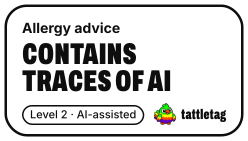
Written by people, with AI help for research and editing. What that means: https://aidisclosurebadge.com/levels/ai-assisted/For the web version, or an email template that accepts HTML, use the badge. It is a plain image inside a plain link, with no script:
<a href="https://aidisclosurebadge.com/levels/ai-assisted/"><img src="https://aidisclosurebadge.com/b/en/pill-ai-assisted-light.svg" width="124" height="28" alt="AI-assisted: AI disclosure badge by Tattletag"></a>Swap ai-assisted for human-made, ai-made-human-checked or ai-generated in both places to change the level. The free AI disclosure badge generator has a Footer line format that gives you the sentence with the link, and a Disclosure Facts label with “1 newsletter” as the serving size, for the about page:
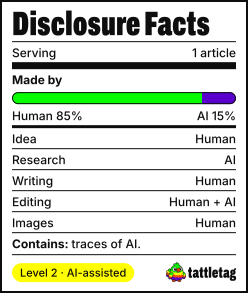

Want the long version that names the tool and each task? The AI disclosure statement generator writes it in a minute, ready for the about page.
What do Substack, beehiiv and other newsletter platforms ask?
None of the big platforms asks for a general AI label on newsletter text. Two of them draw hard lines around fully automated publications, and Substack hands your readers a detector. All rules below were checked on the platforms’ own pages in November 2026.
| Platform | Rule on AI content | What it means for you |
|---|---|---|
| Substack | No disclosure rule. Readers can scan posts and notes published from 21 July 2026 for AI text (Pangram) in the app and on substack.com; your optional “How I make this” statement shows next to the result | Write the statement in Settings, Details before readers scan you |
| beehiiv | Acceptable use policy (modified 16 July 2026): publications that rely entirely on AI without meaningful human input are not permitted; AI-assisted writing is allowed; AI content may not mislead readers into thinking it is human-authored | Level 4 digests break the policy; label level 3 honestly |
| Ghost(Pro) | Lists “machine-generated content” as not hosted: “we don’t host sites for AIs or bots” | A person has to stand behind the publication |
| Mailchimp | Terms (October 2025), section on its own AI features: review AI output before it goes into a campaign | Read what the built-in writer gives you |
| Kit | Acceptable use policy (May 2026) has no AI rule; bans unoriginal or copied content | Label by choice |
| LinkedIn newsletters | No AI-text rule; altered media of real people needs a clear disclosure | Label AI images of people |
The Substack scanner is the twist worth planning for. Its help page says the scan is unavailable in emails and on custom domains, so it only reaches readers in the Substack app and on substack.com. A reader who scans your issue there and gets “likely AI” with no statement from you reads the detector’s verdict alone. A footer line plus a “How I make this” statement gets your version in first.
Is AI disclosure in newsletters required by law?
In the EU, article 50(4) of the EU AI Act (the Commission’s AI Act Service Desk text, checked November 2026) applies since 2 August 2026. Deployers who publish AI-generated or AI-manipulated text “with the purpose of informing the public on matters of public interest” must disclose it. The duty falls away when the text went through human review or editorial control and a person or company holds editorial responsibility for it. Article 50(5) asks for the disclosure to be clear and distinguishable at the latest when readers first see the content.
| Newsletter | EU AI Act article 50(4) (checked November 2026) | Label to use |
|---|---|---|
| Political, health or local news digest written by AI and sent unchecked | Disclosure duty | AI-generated, at the top and in the footer |
| Same digest, an editor reviews every issue and the publisher takes responsibility | Exception applies | AI-made, human-checked keeps readers informed |
| Company product update, recipe letter, hobby newsletter | Rarely “public interest” in the Act’s sense | Label by choice |
| Any newsletter with AI images of real people that look real | Deepfake rule, article 50(4) first subparagraph | Label the image itself |
Our page on EU AI Act article 50 covers deepfakes, the official EU icons and fines. A Tattletag badge tells subscribers how an issue was made; the disclosure the law asks for is your own label, wherever you put it.
Examples by type of newsletter
- Personal essay newsletter. Human-made or AI-assisted. The grumpy sticker “Fine. AI helped. Happy now?” fits writers who used AI for one paragraph and want readers to know they hated it.
- Curated link roundup. Name what AI did in the footer: “Summaries drafted with AI from the linked articles, checked by me.” Readers who click through will compare.
- Company or SaaS newsletter. Drafts start in an AI tool, marketing edits, someone signs off. That is AI-made, human-checked. Name the team’s role in the footer, never a vague “some AI was used”.
- Paid newsletter. Paying subscribers have the strongest claim to know. Put the level in the welcome email and keep the footer line in every issue.
- Automated news digest. Level 4. On beehiiv a fully automated publication with no meaningful human input breaks the acceptable use policy, and on Ghost(Pro) it is not hosted at all. If a human edits every issue, label it level 3 and say who checks.
- Translated edition. You wrote it in one language and AI translated it: AI-assisted, with “translated with AI” in the footer of that edition.
Mistakes to avoid
- A badge with no text. Older Outlook and Apple Mail versions show an empty box. The footer line has to carry the label on its own.
- A blank alt text. If the image is blocked,
alt=""says nothing. Name the level. - One label set years ago. Your workflow changed when you started using AI for drafts. Update the footer and the about page the same week.
- Disclosing only on the web archive. Subscribers who read in the inbox never see it.
- Calling a level 3 issue “AI-assisted”. If AI wrote the draft, readers who find out later quote your label back at you.
Next steps
- Sort your last five issues with the level table.
- Paste the matching footer line into your email template.
- Make a badge for the web version in the badge generator and add the Disclosure Facts label to the about page.
- Writing a blog as well? Our guide on how to label AI-written blog posts covers the web side, and the AI-assisted level page explains what “AI help” covers for readers who click your badge.